Sticker auto layout that leaves no gap unused
CutPapa arranges all your stickers on one 4×7 sticker sheet (101.6 × 177.8 mm). It keeps a fixed gap between stickers (3 mm by default), tries 0° / 90° / 180° / 270° rotations, and picks the arrangement that fits the most stickers in the shortest length of paper. Every time you change a size or a copy count, the whole sheet is arranged again.
Try it: drag the slider to resize
Auto demo running
Illustrative animation: boxes are used here for simplicity. The app arranges stickers by their actual outlines.
How do you arrange stickers without wasting paper?
The slow part of arranging by hand is moving everything else each time one sticker changes. CutPapa hands that to an algorithm. It arranges stickers by their actual outline including the white border, not by a bounding box, so the bulge of one sticker can sit in the hollow of another.
It runs several sort orders (area, longest side, height, and width, largest first) with different placement scores, then keeps the result that fits the most stickers and, next, uses the least paper length. Unused paper is left together at the bottom of the sheet.
What happens to the other stickers when I resize one?
They move aside and re-arrange automatically. Width can be set from 10 to 95 mm, in 0.5 mm slider steps. Copies can be a fixed number, or you can turn on Fill Sheet and let the app fill the remaining space until nothing else fits.
You can also work directly on the canvas: click, drag a selection box, or drag a handle to scale. Drag a sticker to the position you want and it locks there, and the others re-arrange around it.
What happens when a sticker does not fit?
Stickers that do not fit are listed below the sheet and marked. They are not printed, and they are not shrunk without asking. You decide whether to make them smaller, reduce the copies, or move them to the next sheet.
Can I change the gap and the margin?
Yes. The gap between stickers and the margin from the paper edge are both 3 mm by default and can be changed in the sheet settings. The gap is the minimum distance between any two cut lines, which leaves room to peel each sticker.
Rotation can be switched for the whole sheet or fixed for a single sticker. With rotation off, all stickers face the same way and look tidiest. With rotation on, you save the most paper.
Last updated:
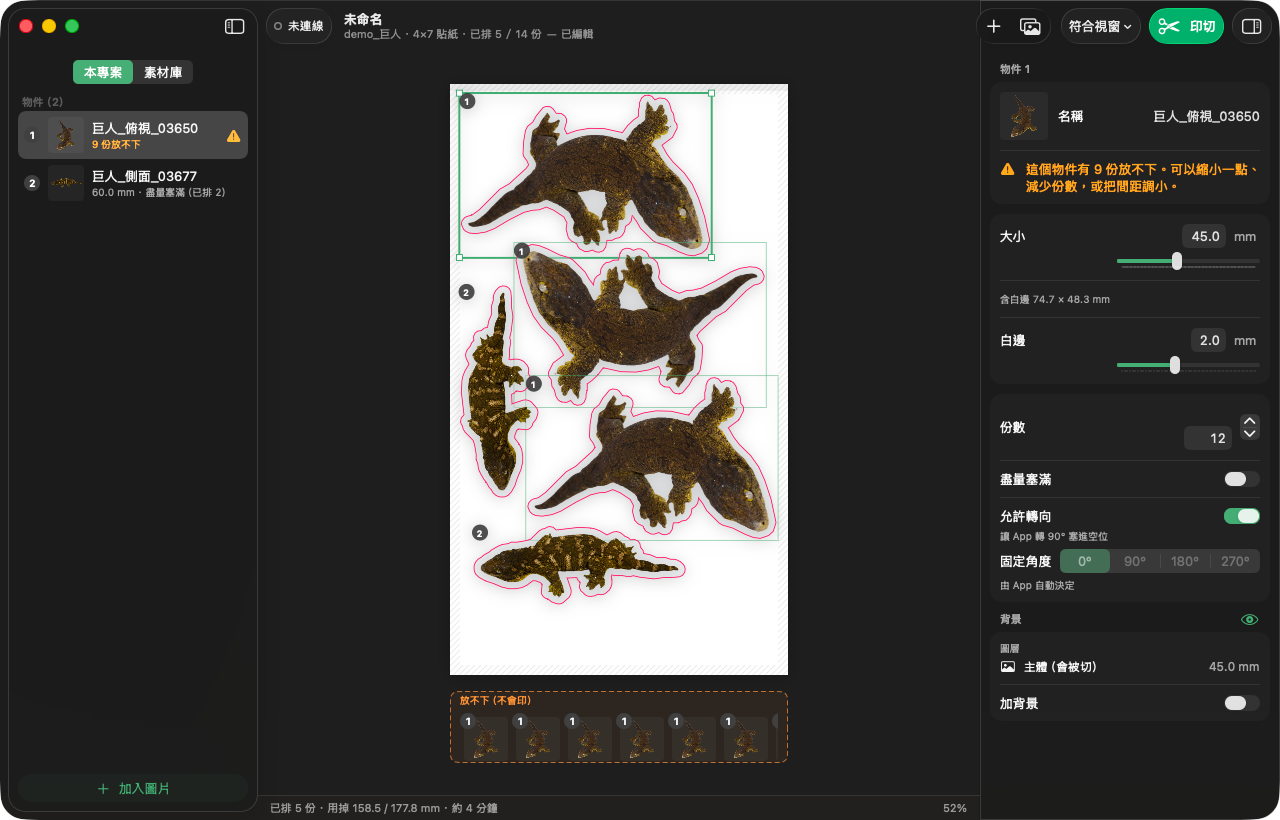
Screenshots show the Traditional Chinese interface.
More features
One-step background removal, border and cut line included
Backgrounds are removed on your Mac with the Vision framework built into macOS. Photos are never uploaded. Set the white border from 0 to 5 mm per sticker; the cut line follows its outer edge. Cut lines are smoothed with rounded joins, and you can choose a softer rounded outline for cleaner sticker edges.
Check before you print, because one wasted sheet is too many
Before every job you must confirm which paper is loaded. Cut lines, real sizes in mm, and blade pressure are all visible. If something fails, the job stops. It never reprints on its own.